The 401 Unauthorized Wall: Why Weekend Weather Apps Die Before the First Fetch
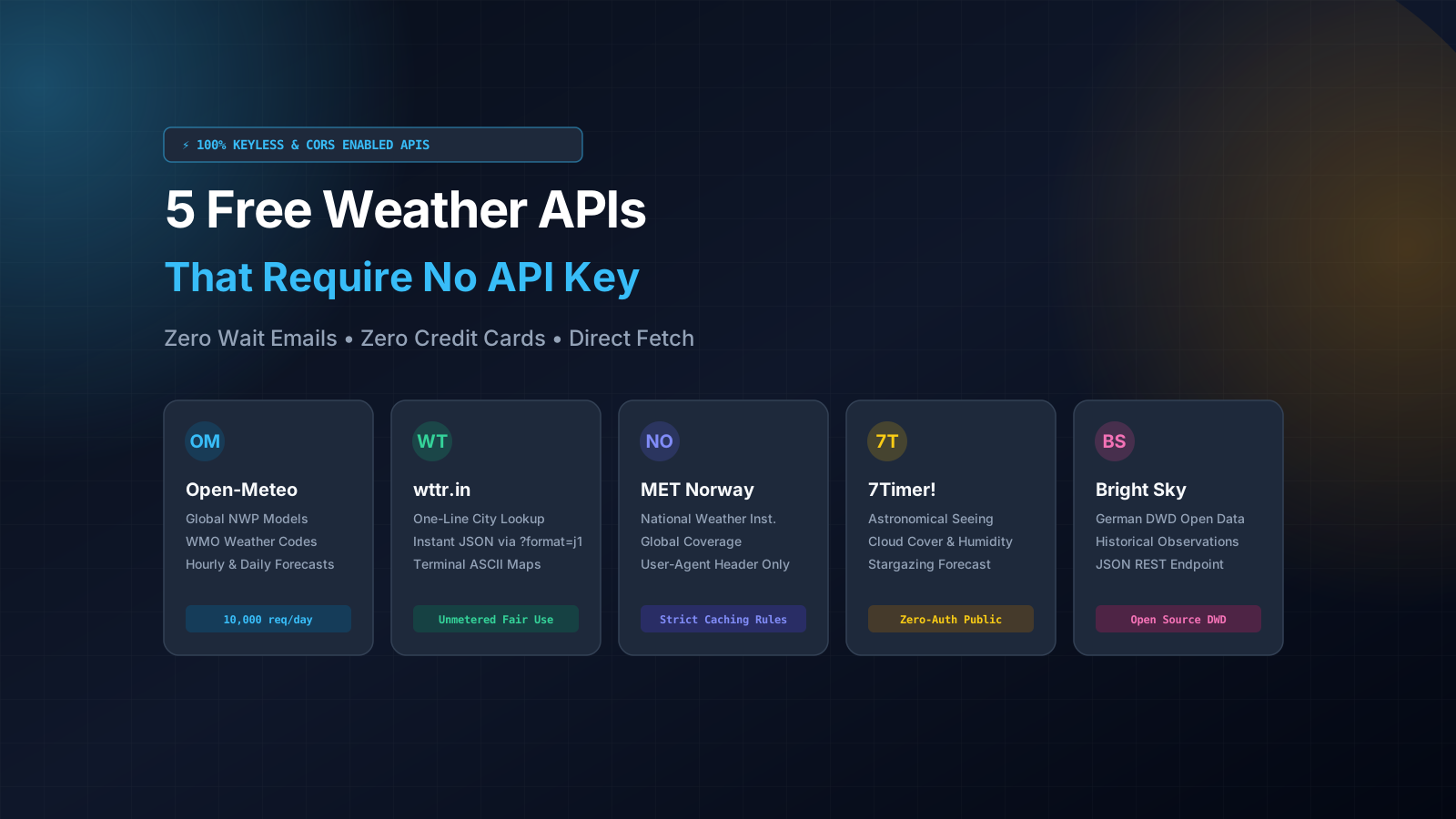
The best completely free weather API that requires zero API key in 2026 is Open-Meteo: it provides global numerical weather forecasts, hourly forecasts, WMO condition codes, and wildcard CORS support with a generous limit of 10,000 daily calls for open-source use. If you need instant one-line city weather without coordinates, use wttr.in. For astronomical cloud cover and stargazing, use 7Timer!. For authoritative European climate records, use MET Norway or Bright Sky.
Every developer has lived through this exact scenario. It is Sunday afternoon. You sit down with a cup of hot chai at your desk, fire up your code editor on your laptop, and decide to build a clean weather dashboard or mobile widget for your portfolio. You want to practice CSS grid, display animated temperature curves, and wire up geolocation.
You search Google for popular weather services. OpenWeatherMap and WeatherAPI pop up on page one. You click signup, fill out a form, verify your email, and copy your brand new API key into your code. You hit fetch() in your browser console, expecting sunshine and degrees Celsius.
Instead, your console turns bright red with an ugly error: HTTP 401 Unauthorized.
You re-check your code. You re-read your parameters. You check the headers. Everything looks perfect. Then you search community forums and discover the fine print: "New API keys take 1 to 3 hours to activate across our global edge servers."
Your afternoon coding rhythm is shattered. By the time that key activates, your momentum is gone. Other services are even worse: they demand an international credit card upfront just to start a "free trial". If you are an engineering student in India with a local RuPay debit card, the payment gateway rejects it immediately. Your project dies before you even write your first component.
Here is what the corporate tutorials never tell you: you do not need an API key to build a weather app. Several international meteorological institutes and open-source foundations publish global weather forecasts over public REST endpoints. You can query them right now directly from your browser, terminal, or mobile app with zero keys, zero accounts, and zero credit cards.
The 5 Best Free Weather APIs That Require No API Key
Here are the 5 best keyless weather APIs available in 2026, complete with endpoint URLs, query parameters, rate limits, and real-world code examples.
1. Open-Meteo: The Global Standard for Keyless Weather Forecasting
Open-Meteo is by far the most powerful and developer-friendly free weather API on the internet. Created by Z感ner & Partner and backed by open data from national weather agencies across Europe, America, and Asia, it operates with a simple philosophy: open meteorological science belongs to everyone.
You do not need an account. You do not need a developer token. You simply pass latitude and longitude coordinates into the endpoint, and you get back granular hourly and daily forecasts.
# Fetch hourly temperature, humidity, and weather codes for New Delhi (Zero Key)
curl "https://api.open-meteo.com/v1/forecast?latitude=28.6139&longitude=77.2090¤t=temperature_2m,relative_humidity_2m,weather_code,wind_speed_10m&hourly=temperature_2m,precipitation_probability&timezone=Asia%2FKolkata"
The JSON response from Open-Meteo is clean, typed, and structured for fast parsing:
{
  "latitude": 28.625,
  "longitude": 77.25,
  "generationtime_ms": 0.082,
  "utc_offset_seconds": 19800,
  "timezone": "Asia/Kolkata",
  "timezone_abbreviation": "IST",
  "elevation": 216.0,
  "current": {
    "time": "2026-11-19T14:00",
    "interval": 900,
    "temperature_2m": 26.4,
    "relative_humidity_2m": 48,
    "weather_code": 1,
    "wind_speed_10m": 7.2
  },
  "hourly": {
    "time": ["2026-11-19T00:00", "2026-11-19T01:00", "2026-11-19T02:00"],
    "temperature_2m": [19.2, 18.5, 17.9],
    "precipitation_probability": [0, 0, 0]
  }
}
Why Open-Meteo Dominates for Developers:
- Universal WMO Weather Interpretation Codes: Instead of arbitrary text strings like "mildly sunny", Open-Meteo uses the international World Meteorological Organization standard (e.g. 0 = Clear Sky, 1-3 = Partly Cloudy, 45-48 = Fog, 51-67 = Rain, 71-77 = Snow, 95-99 = Thunderstorm). You can map these integer codes to your UI icon set in a simple switch statement.
- Wildcard CORS Headers: The server returns
Access-Control-Allow-Origin: *. You can call it directly from client-side React, Vue, Svelte, or vanilla JavaScript without spinning up an Express or Next.js proxy. - High-Resolution Numerical Weather Prediction (NWP): Behind the scenes, Open-Meteo aggregates high-resolution models from NOAA GFS, ECMWF IFS, DWD ICON, and Météo-France ARPEGE, dynamically selecting the highest-accuracy model for your requested coordinates.
- Specialized Solar and Marine Models: Need solar irradiance (DNI, DHI, GHI) for a solar energy dashboard? Or wave heights and ocean tides for a surfing app? Open-Meteo offers dedicated keyless endpoints for both.
- Rate Limit: 10,000 calls per day for non-commercial and open-source use. That is more than enough to build, test, and showcase any portfolio application.
2. wttr.in: The Instant One-Line Weather Engine
If you need weather data for a named city (like "Mumbai", "London", or "Toronto") and do not want to look up latitude and longitude first, wttr.in is your best friend. Built by open-source creator Igor Chubin, wttr.in is legendary among Linux and DevOps engineers for rendering rich weather forecasts directly in the terminal.
Most developers do not know that wttr.in also provides an instant, structured JSON API when you append the ?format=j1 flag:
# Get instant JSON weather for any city name without coordinates
curl "https://wttr.in/Bengaluru?format=j1"
The response contains three nested sections: current_condition, weather (a 3-day forecast with 3-hour slices), and nearest_area:
{
  "current_condition": [
    {
      "FeelsLikeC": "24",
      "temp_C": "23",
      "humidity": "62",
      "weatherDesc": [
        { "value": "Partly cloudy" }
      ],
      "windspeedKmph": "11",
      "uvIndex": "4"
    }
  ],
  "weather": [
    {
      "date": "2026-11-19",
      "maxtempC": "28",
      "mintempC": "18",
      "astronomy": [
        {
          "sunrise": "06:18 AM",
          "sunset": "05:51 PM",
          "moon_phase": "Waxing Gibbous"
        }
      ]
    }
  ]
}
When to Use wttr.in:
- CLI Tools and Terminal Dashboards: Run
curl wttr.in/Kolkatain any bash shell or PowerShell prompt and you get a stunning ASCII art weather map with wind arrows and moon phases. - Rapid Prototyping: You can build a search bar where users type any city name in plain English, and wttr.in resolves the city name automatically without requiring an intermediate geocoding step.
- Rate Limit: Unmetered fair use. Avoid hammering it with more than a few calls per second, and it will serve your portfolio app reliably.
3. MET Norway Weather API: Official Scandinavian National Data
The Norwegian Meteorological Institute (Meteorologisk institutt) provides one of the most respected public weather APIs in the world. This is the exact scientific data engine that powers Yr.no, one of the top five global weather websites.
Their Locationforecast 2.0 REST API provides complete, highly accurate global weather forecasts without any API key or subscription.
# Query MET Norway Locationforecast (User-Agent header is strictly required)
curl "https://api.met.no/weatherapi/locationforecast/2.0/compact?lat=19.0760&lon=72.8777"      -H "User-Agent: DropoutDevWeatherApp/1.0 (contact@dropoutdeveloper.in)"
The Golden Rule of MET Norway: The User-Agent Header
MET Norway does not ask for an API key, but they enforce one strict condition in their Terms of Service: every HTTP request must include a descriptive User-Agent header that contains the name of your app and a contact email or website URL.
If you call this API from JavaScript with a generic browser User-Agent or an empty header, their edge firewall will return an immediate HTTP 403 Forbidden. When calling it from a Node.js backend, mobile Flutter app, or Next.js route, set the header properly and you unlock enterprise-grade forecast data for free.
Key Technical Features:
- GeoJSON Data Architecture: Responses follow standard GeoJSON specifications, returning a
FeatureCollectionwith time series timestamps and symbol codes (e.g.clearsky_day,heavyrain). - Intelligent Edge Caching: MET Norway returns an
ExpiresHTTP header indicating the exact second when new forecast model runs will be published. Cache the response locally until that timestamp, and your app will never fetch redundant data.
4. 7Timer!: Astronomical Seeing and Outdoor Activity Forecasts
Most weather APIs tell you whether it is hot or rainy. But what if you are building an application for stargazers, amateur astronomers, drone pilots, or outdoor landscape photographers?
7Timer! is an open-source meteorological prediction tool built on NOAA's GFS model. It was created specifically for the astronomy community to predict atmospheric conditions that affect telescope observation.
# Query astronomical seeing conditions and cloud cover
curl "https://www.7timer.info/bin/astro.php?lon=77.209&lat=28.613&ac=0&unit=metric&output=json"
What 7Timer! Measures:
- Astronomical Seeing: An index measuring atmospheric turbulence and how sharply telescope optics can resolve distant star clusters or planetary rings.
- Atmospheric Transparency: Measures how clear the sky is from dust, water vapor, and haze.
- Cloud Cover by Atmospheric Layer: Unlike generic APIs that give a single cloud percentage, 7Timer! breaks cloud cover into high, middle, and low-altitude cloud percentages.
- No Authentication: 100% public, keyless access. You can query both the
astroandcivilendpoints without credentials.
5. Bright Sky: Open-Source DWD German Weather Service Data
Bright Sky is a free, modern JSON REST API that converts raw meteorological observations from the German National Weather Service (Deutscher Wetterdienst - DWD) into clean JSON structures. Built and maintained as an open-source public service, Bright Sky eliminates the pain of parsing archaic binary meteorological formats.
While DWD radar and weather stations are primarily concentrated in Central Europe, Bright Sky provides complete global coverage through SYNOP weather station networks.
# Fetch hourly weather observations from Bright Sky (Zero API Key)
curl "https://api.brightsky.dev/weather?lat=52.5200&lon=13.4050&date=2026-11-19"
The response includes exact station IDs, distance to the nearest physical meteorological sensor, wind speed, precipitation, cloud cover, and solar radiation.
Why Bright Sky Belongs in Your Toolkit:
- True Historical Weather Records: Most commercial APIs charge $50/month for historical data older than 7 days. Bright Sky lets you query historical observations across thousands of global stations for free.
- Self-Hostable with Docker: If you ever need to run your own weather API cluster without relying on external servers, the entire Bright Sky engine is open-source under the MIT license and runs on Docker.
Feature Comparison: The 5 Keyless Weather APIs Compared
To help you choose the ideal data source for your project requirements, here is an objective comparison of all five keyless APIs across critical technical parameters:
| API Name | Authentication | Primary Strength | Browser CORS | Rate Limit | Best Portfolio Project |
|---|---|---|---|---|---|
| Open-Meteo | None (100% Keyless) | Global NWP models, hourly variables & WMO codes | Yes (Wildcard *) | 10,000 calls / day | Modern React/Vue weather dashboards, solar calculators |
| wttr.in | None (100% Keyless) | City name search, zero coordinates needed, ASCII UI | Yes | Fair use (~10 req/s) | Terminal CLI weather utilities, quick city search widgets |
| MET Norway | User-Agent Header | Official Scandinavian accuracy, GeoJSON format | Requires Proxy / App | Fair use (~20 req/s) | Mobile Flutter/React Native apps, edge-cached servers |
| 7Timer! | None (100% Keyless) | Atmospheric seeing, transparency & cloud layers | Yes | Fair use | Astronomy guides, stargazing maps & drone flight alerts |
| Bright Sky | None (100% Keyless) | Verified physical station data & historical archives | Yes | Fair use | Climate change dashboards, historical weather audits |
Project Blueprint: Building AtmosPulse (Zero-Auth Live Weather Dashboard)
Now let us connect these endpoints into a real, production-ready portfolio project called AtmosPulse. Instead of building a generic copy of someone else's tutorial, AtmosPulse implements solid engineering practices that will impress senior hiring managers during technical interviews.
System Architecture
- Hardware Geolocation with Graceful Fallback: The app first requests user coordinates via the browser's native
navigator.geolocationAPI. If the user denies permission, the client gracefully falls back to a default location (such as New Delhi: 28.6139° N, 77.2090° E) without showing a broken error screen. - Direct Keyless Ingestion: The frontend queries Open-Meteo directly. Because Open-Meteo sends open CORS headers, zero server infrastructure is required.
- WMO Condition Interpretation: The client translates raw numerical WMO weather codes into human-readable descriptions and animated SVG icon states.
- Intelligent LocalStorage Caching with TTL: Weather changes slowly. A user does not need new temperature data every 10 seconds. AtmosPulse stores each weather snapshot in
localStoragewith a 30-minute Time-To-Live (TTL). When the user refreshes the page or reopens the tab, the UI renders instantly from cache without making a network call. - Network Timeout and Cancellation: Every outgoing fetch request is wrapped in an
AbortControllerwith an 8-second timeout, ensuring the app never hangs indefinitely on poor mobile 4G connections.
Production JavaScript Implementation: Fetch with AbortController and Timeout
Here is the complete, runnable JavaScript client that powers AtmosPulse. It demonstrates modern asynchronous programming, error classification, TTL caching, and WMO code mapping:
/**
 * AtmosPulse Weather Client
 * 100% Keyless, Zero-Config Weather Ingestion with LocalStorage TTL Caching
 */

// WMO Weather Interpretation Code Map
const WMO_CODE_MAP = {
  0: { label: 'Clear sky', icon: '☀️' },
  1: { label: 'Mainly clear', icon: '🌤️' },
  2: { label: 'Partly cloudy', icon: '⛅' },
  3: { label: 'Overcast', icon: '☁️' },
  45: { label: 'Foggy', icon: '🌫️' },
  48: { label: 'Depositing rime fog', icon: '🌫️' },
  51: { label: 'Light drizzle', icon: '🌦️' },
  53: { label: 'Moderate drizzle', icon: '🌧️' },
  55: { label: 'Dense drizzle', icon: '🌧️' },
  61: { label: 'Slight rain', icon: '🌦️' },
  63: { label: 'Moderate rain', icon: '🌧️' },
  65: { label: 'Heavy rain', icon: '⛈️' },
  71: { label: 'Slight snowfall', icon: '🌨️' },
  73: { label: 'Moderate snowfall', icon: '❄️' },
  75: { label: 'Heavy snowfall', icon: '❄️' },
  80: { label: 'Slight rain showers', icon: '🌦️' },
  81: { label: 'Moderate rain showers', icon: '🌧️' },
  82: { label: 'Violent rain showers', icon: '⛈️' },
  95: { label: 'Thunderstorm', icon: '⚡' },
};

/**
 * Fetch weather with AbortController timeout protection
 */
async function fetchWithTimeout(url, options = {}, timeoutMs = 8000) {
  const controller = new AbortController();
  const id = setTimeout(() => controller.abort(), timeoutMs);

  try {
    const response = await fetch(url, {
      ...options,
      signal: controller.signal,
    });
    clearTimeout(id);
    return response;
  } catch (error) {
    clearTimeout(id);
    if (error.name === 'AbortError') {
      throw new Error(`Weather request timed out after ${timeoutMs}ms`);
    }
    throw error;
  }
}

/**
 * Get current weather for latitude and longitude
 * Cached for 30 minutes in browser localStorage
 */
export async function getLiveWeather(latitude, longitude) {
  const cacheKey = `atmospulse_${latitude.toFixed(2)}_${longitude.toFixed(2)}`;
  const TTL_MS = 30 * 60 * 1000; // 30 minutes

  // 1. Check local storage cache
  try {
    const cached = localStorage.getItem(cacheKey);
    if (cached) {
      const parsed = JSON.parse(cached);
      const age = Date.now() - parsed.timestamp;
      if (age < TTL_MS) {
        return { ...parsed.data, fromCache: true };
      }
      localStorage.removeItem(cacheKey);
    }
  } catch (e) {
    console.warn('LocalStorage access restricted or unavailable:', e);
  }

  // 2. Query Open-Meteo REST API
  const endpoint = new URL('https://api.open-meteo.com/v1/forecast');
  endpoint.searchParams.set('latitude', latitude);
  endpoint.searchParams.set('longitude', longitude);
  endpoint.searchParams.set('current', 'temperature_2m,relative_humidity_2m,apparent_temperature,weather_code,wind_speed_10m,surface_pressure');
  endpoint.searchParams.set('hourly', 'temperature_2m,precipitation_probability');
  endpoint.searchParams.set('timezone', 'auto');

  const res = await fetchWithTimeout(endpoint.toString());

  if (!res.ok) {
    throw new Error(`Open-Meteo API error: HTTP ${res.status} ${res.statusText}`);
  }

  const payload = await res.json();
  const current = payload.current;
  const weatherInfo = WMO_CODE_MAP[current.weather_code] || { label: 'Unknown', icon: '❓' };

  const formattedData = {
    coordinates: { latitude, longitude },
    timezone: payload.timezone,
    temperatureCelsius: current.temperature_2m,
    feelsLikeCelsius: current.apparent_temperature,
    humidityPercent: current.relative_humidity_2m,
    windSpeedKmh: current.wind_speed_10m,
    pressureHpa: current.surface_pressure,
    condition: weatherInfo.label,
    icon: weatherInfo.icon,
    wmoCode: current.weather_code,
    hourlyForecast: payload.hourly.time.slice(0, 12).map((time, idx) => ({
      time,
      temp: payload.hourly.temperature_2m[idx],
      rainProb: payload.hourly.precipitation_probability[idx],
    })),
  };

  // 3. Save to localStorage with timestamp
  try {
    localStorage.setItem(cacheKey, JSON.stringify({
      data: formattedData,
      timestamp: Date.now(),
    }));
  } catch (e) {
    console.warn('Failed to save weather cache:', e);
  }

  return { ...formattedData, fromCache: false };
}
Explore Free Public APIs Without Keys
Weather is just the beginning. From real-time currency exchange rates and dictionary definitions to country borders and space satellite positions, the open internet provides hundreds of zero-auth datasets.
Common Gotchas When Working with Public Weather APIs
When you integrate public endpoints into frontend applications, keep these four architectural rules in mind:
1. Do Not Poll Public APIs in Fast Loops
Never set a setInterval() timer that queries a weather API every 10 seconds. Weather forecasts do not update every second; meteorological models run every 1 to 6 hours. Polling every few seconds wastes bandwidth, drains client mobile batteries, and risks getting your IP address banned by rate limiting firewalls.
2. Always Cache Responses in LocalStorage or Memory
Store weather data with a 15 to 30 minute expiration window. If a user navigates between routes or refreshes the page, serve the data instantly from local cache. This guarantees sub-millisecond page loads and saves public server resources.
3. Handle Geolocation Permissions Gracefully
Never leave your UI in a permanent loading skeleton if the user dismisses the browser location prompt. Always add an error handler to navigator.geolocation.getCurrentPosition() and fall back to a sensible default city.
4. Combine Keyless Weather with Open Geocoding
Want to let users search for weather by postal code or landmark? Pair Open-Meteo with Nominatim OpenStreetMap. Nominatim gives you latitude and longitude for free without an API key, and Open-Meteo gives you the forecast. Your entire location and weather pipeline runs at zero cost.
Frequently Asked Questions (FAQ)
Does Open-Meteo require an API key?
No. Open-Meteo is completely keyless and free for non-commercial and open-source use. You can make up to 10,000 requests per day without registering an account, providing an email, or entering payment information.
Which free weather API is best for mobile apps without a key?
Open-Meteo and MET Norway are the two best options for mobile apps. Open-Meteo is easier to use because it supports direct REST queries without headers. MET Norway provides official government forecast accuracy, but requires you to include a descriptive User-Agent header in your app's HTTP configuration.
Can I use wttr.in for production applications?
wttr.in is ideal for developer tools, CLI utilities, and small portfolio projects. However, because it is an open-source community service maintained on modest infrastructure, you should avoid using it for high-traffic commercial applications. For commercial scale, use Open-Meteo or self-host your own weather instance.
What are WMO weather codes and why do they matter?
WMO weather codes are standardized integer values established by the World Meteorological Organization to represent weather conditions across languages. Instead of parsing messy, localized strings like "partly cloudy with showers", your code can check an integer like 61 (slight rain) or 95 (thunderstorm), making UI rendering simple and bug-free.
How do I handle CORS errors when calling MET Norway from the browser?
MET Norway does not return wildcard CORS headers because their Terms of Service require a descriptive User-Agent header, which browsers restrict on cross-origin requests. To query MET Norway, fetch the data through a lightweight Next.js server route, Express proxy, or Cloudflare Worker that injects your User-Agent header.