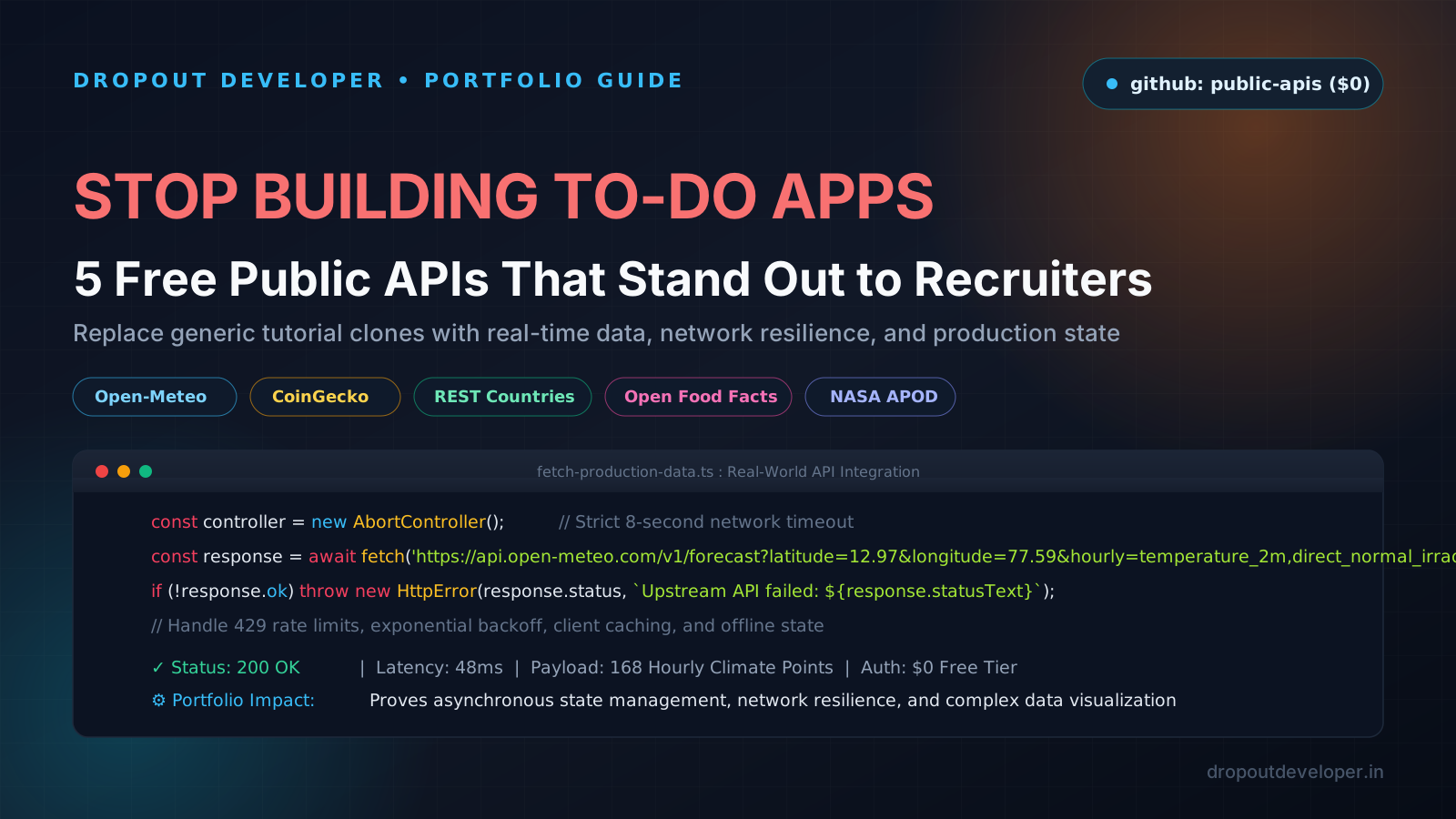
The Harsh Truth: Why Recruiters Skip Resumes With To-Do Apps
When I was trying to break out of low-paying service company jobs in India, I made a massive mistake. I watched a 40-hour web development tutorial, followed the instructor step by step, and put three projects on my resume:
- A React To-Do List with localStorage.
- A single-city Weather app showing a sunny icon.
- A basic calculator.
I sent out 120 resumes across LinkedIn and job boards. Guess how many interview callbacks I got? Zero.
At the time, I thought the job market was rigged or that nobody hires from Tier-3 colleges. But later, once I got into a proper software engineering team and sat on the hiring side of the table, reality hit me like a bucket of cold water.
Hiring managers and senior engineers review hundreds of junior developer portfolios every single week. Nearly 80% of those resumes link to the exact same three tutorial clones. The code is identical. The styling is identical. Even the variable names match the YouTube video.
What To-Do Apps Actually Tell a Hiring Manager
A To-Do app proves only one thing: you know how to copy code from a tutorial. It tells the team nothing about whether you can survive in a real production codebase. Look at what tutorial apps completely skip:
- Zero Network Failures: Everything lives in local memory or localStorage. Your app never has to handle a dropped connection on a crowded train, high network jitter, or an API server returning a 503 error.
- Zero Asynchronous State: You never have to handle loading skeletons, race conditions when two requests fire at once, or cache invalidation.
- Zero Rate-Limit Handling: Real-world APIs restrict traffic. If an API returns HTTP 429 Too Many Requests, does your app crash into a blank white screen, or does it queue requests and back off cleanly?
- Zero Edge-Case Data: Tutorial data is clean. Real data has missing fields, null values, malformed unicode, and arrays with 10,000 items that freeze the browser if rendered without pagination or virtualization.
If you want hiring managers to stop scrolling past your resume, you need projects that interact with messy, real-world data. You do not need to spend money on expensive cloud databases or paid API subscriptions. The open source community has already done the heavy lifting for you.
The Treasure Chest: github.com/public-apis/public-apis
If you have not starred github.com/public-apis/public-apis yet, open it right now. It is one of the most popular repositories on GitHub with over 300,000 stars. It curates hundreds of free public APIs across weather, finance, science, sports, and geography.
The problem is that most beginners scroll through the list, pick the easiest API, and build another surface-level project. They fetch one JSON object, dump it into a card, and call it a day.
Do not do that. Here are 5 battle-tested public APIs from the repository, along with the exact project architectures that prove you understand production engineering.
1. Open-Meteo: Real-Time Global Climate & Solar Irradiance
API Endpoint: https://api.open-meteo.com/v1/forecast
Authentication: None required (Zero API keys, completely free for non-commercial use)
Website: open-meteo.com
Forget OpenWeatherMap where you have to sign up, verify an email, wait 2 hours for an API key activation, and get hit with strict call limits. Open-Meteo is open-source, lightning fast, and requires zero authentication.
More importantly, it provides deep meteorological data: hourly temperature, soil moisture at multiple depths, direct normal solar irradiance, wind gusts at 80 meters, and historical weather records dating back to 1940.
What Beginners Build (Avoid This):
A weather card that asks for 'Delhi', shows '31°C Sunny', and displays an umbrella icon. Every recruiter has seen this 500 times.
What You Should Build: AgriSolar (Solar Output & Irrigation Monitor)
Build a dashboard designed for farmers or solar rooftop owners in your state:
- Solar Energy Prediction: Query the
direct_normal_irradianceandcloudcoverhourly fields. Calculate estimated kilowatt-hour (kWh) generation for a standard 3kW rooftop solar setup over the next 7 days using an interactive chart. - Agricultural Soil Moisture Alerts: Fetch
soil_moisture_0_to_1cmandsoil_moisture_1_to_3cm. If soil moisture drops below 20% for 48 consecutive hours, flag an automated irrigation alert. - Historical Climate Comparison: Use Open-Meteo's historical archive API to compare this week's rainfall against the 10-year historical average for that specific latitude and longitude.
2. CoinGecko API: Live Market Arbitrage & Volatility Screener
API Endpoint: https://api.coingecko.com/api/v3/coins/markets
Authentication: Free Public Tier (No credit card, 30 calls/minute)
Website: coingecko.com/api
CoinGecko tracks over 10,000 coins across hundreds of global exchanges. It gives you 24-hour trading volumes, market capitalizations, high/low price spreads, order book depths, and 7-day sparkline price arrays.
What Beginners Build (Avoid This):
A table showing the top 10 coins by market cap with their current prices in USD.
What You Should Build: Multi-Asset Volatility Screener with Rate-Limit Backoff
Build a financial screener that solves actual engineering hurdles:
- Client-Side Sparkline Visualizer: Take CoinGecko's raw
sparkline_in_7dnumeric arrays (168 hourly price points per coin) and render lightweight SVG or HTML5 Canvas trendlines without bloating your bundle with heavy chart libraries. - Handling HTTP 429 Rate Limits: CoinGecko's free tier allows 30 calls per minute. If a user rapidly searches or filters coins, your app will trigger a 429 status code. Write an exponential backoff retry interceptor with an in-memory cache (5-minute TTL) so repeated requests never hit the network.
- Arbitrage Spread Calculator: Compare price differences across different trading pairs or display top gainers and losers filtered by 24h trading volume to filter out low-liquidity scam tokens.
3. REST Countries API: Border Routing & International Travel Graph
API Endpoint: https://restcountries.com/v3.1/all
Authentication: None required (Zero auth, 100% open)
Website: restcountries.com
REST Countries gives you structured data on 250 countries: land borders (as Alpha-3 code arrays like ["IND", "NPL", "BTN", "BGD"]), currencies, official languages, timezones, regional trade blocs, and capital city coordinates.
What Beginners Build (Avoid This):
A country list with a search bar and a national flag image.
What You Should Build: BorderCross (Overland Journey & Currency Graph)
Turn raw geographic data into a graph traversal problem:
- Land Border Pathfinding: Treat every country as a graph node and its
bordersarray as edges. Allow the user to pick a starting country and destination (for example: India to France). Run a Breadth-First Search (BFS) algorithm to calculate the shortest path through land borders. - Cross-Border Currency Checklist: For each country along the calculated route, extract the local currency code and display the required conversions.
- Timezone Offset Timeline: Plot the total timezone shift across the entire journey, flagging which border crossings involve language changes or major time shifts.
4. Open Food Facts: Smart Barcode Scanner & Allergen Checker
API Endpoint: https://world.openfoodfacts.org/api/v2/product/{barcode}.json
Authentication: None required (Free public open database)
Website: world.openfoodfacts.org
Open Food Facts is a collaborative, open database containing over 3,000,000 packaged food products from all over the world. It provides ingredient lists, allergen tags, Nutri-Scores (A through E), NOVA food processing classifications (1 through 4), and packaging recycling info.
What Beginners Build (Avoid This):
A simple text search box where you type 'milk' and it lists 5 products.
What You Should Build: SafeBite (PWA Barcode Scanner & Hidden Additives Detector)
Build a mobile-first Progressive Web App (PWA) that feels like a native mobile tool:
- Camera Barcode Scanning: Use the browser's native
BarcodeDetectorAPI (or a lightweight library like ZXing) to scan real product barcodes directly from a smartphone camera. - Personalized Allergen Filtering: Let the user save their personal dietary profile locally (such as lactose intolerance, peanut allergy, or vegetarian preference). When a barcode is scanned, parse the
allergens_hierarchyandingredients_analysis_tagsarrays to display an instant green safety check or a bright red warning banner. - Ultra-Processed Food Score: Highlight whether the item belongs to NOVA Group 4 (ultra-processed food) and list specific artificial emulsifiers or preservatives detected in the ingredients list.
- Offline Fallback: Cache previously scanned barcodes in IndexedDB so users can check products inside supermarket basements where mobile signal is dead.
5. NASA Open APIs: Mars Rover Mission Explorer & APOD Archive
API Endpoint: https://api.nasa.gov/mars-photos/api/v1/rovers/curiosity/photos
Authentication: Free API key (1,000 requests/hour instantly, or use DEMO_KEY)
Website: api.nasa.gov
NASA provides an incredible suite of open scientific APIs. The Mars Rover Photos API gives you access to real raw telemetry and photographs taken on the surface of Mars by the Curiosity, Opportunity, and Perseverance rovers, categorized by Martian mission day (Sol) and camera sensors (Front Hazard Avoidance, Mast Camera, Navigation Camera).
What Beginners Build (Avoid This):
A page that displays NASA's Astronomy Picture of the Day with a title and paragraph.
What You Should Build: RedPlanet (Martian Sensor Explorer with List Virtualization)
Build a space exploration tool that proves you can handle high-density media without killing browser performance:
- Sol & Sensor Filtering: Let users filter rover photos by Martian Sol (0 through 4,000+), rover camera angle (FHAZ, RHAZ, MAST, NAVCAM), and Earth date.
- Virtual Scrolling for Performance: A single Martian Sol can have 800+ raw high-resolution images. If you render 800 image tags in standard React, the DOM will stutter and memory consumption will spike. Implement a virtualized grid (using
react-windowor custom scroll math) so only visible photos are mounted in the DOM. - Progressive Image Loading: Display low-resolution blur placeholders while fetching NASA's full-size camera files, with full-screen zoom modals and camera telemetry overlays.
Production Code: The Fetch Wrapper That Gets You Hired
In technical interviews, senior engineers will look at your GitHub repositories to see how you make network calls. If your repository contains code like this:
// Rookie Tutorial Code: DO NOT PUT THIS ON YOUR GITHUB
const response = await fetch('https://api.example.com/data');
const data = await response.json();
setData(data);
That code is a red flag. What happens if the server takes 45 seconds to respond? The request hangs. What happens if the API returns a 500 server error? The fetch promise resolves without throwing, your code tries to parse invalid JSON or read properties of undefined, and the UI crashes. What happens if the network drops? You get an unhandled rejection.
Here is what clean, production-grade network code looks like. It includes timeout protection via AbortController, HTTP status validation, and an exponential backoff retry loop for transient failures:
/**
 * Production-ready fetch wrapper with timeouts and exponential retry backoff.
 * Dropout Developer Architecture Standard.
 */

interface FetchOptions extends RequestInit {
  timeoutMs?: number;
  maxRetries?: number;
  backoffDelayMs?: number;
}

export class ApiError extends Error {
  constructor(
    public status: number,
    public statusText: string,
    public details?: unknown
  ) {
    super(`API Error ${status}: ${statusText}`);
    this.name = 'ApiError';
  }
}

export async function fetchWithResilience(
  url: string,
  options: FetchOptions = {}
): Promise {
  const {
    timeoutMs = 8000,
    maxRetries = 2,
    backoffDelayMs = 600,
    ...fetchOptions
  } = options;

  let attempt = 0;

  while (attempt <= maxRetries) {
    const controller = new AbortController();
    const timeoutTimer = setTimeout(() => controller.abort(), timeoutMs);

    try {
      const response = await fetch(url, {
        ...fetchOptions,
        signal: controller.signal,
      });

      clearTimeout(timeoutTimer);

      // Handle HTTP status failures explicitly
      if (!response.ok) {
        // If rate-limited (429) or upstream error (502/503/504), consider retrying
        const isTransient = response.status === 429 || response.status >= 500;

        let errorBody: unknown;
        try {
          errorBody = await response.json();
        } catch {
          errorBody = await response.text();
        }

        if (isTransient && attempt < maxRetries) {
          attempt++;
          const waitTime = backoffDelayMs * Math.pow(2, attempt);
          await new Promise((resolve) => setTimeout(resolve, waitTime));
          continue;
        }

        throw new ApiError(response.status, response.statusText, errorBody);
      }

      // Successful response parsing
      const data: T = await response.json();
      return data;
    } catch (err: unknown) {
      clearTimeout(timeoutTimer);

      if (err instanceof ApiError) {
        throw err;
      }

      // Handle request aborts (timeouts)
      if (err instanceof DOMException && err.name === 'AbortError') {
        throw new Error(`Network timeout: Request exceeded ${timeoutMs}ms limit.`);
      }

      // For network dropouts, retry if attempts remain
      if (attempt < maxRetries) {
        attempt++;
        const waitTime = backoffDelayMs * Math.pow(2, attempt);
        await new Promise((resolve) => setTimeout(resolve, waitTime));
        continue;
      }

      throw new Error(`Network failure: ${err instanceof Error ? err.message : 'Unknown error'}`);
    }
  }

  throw new Error('Unexpected retry loop exit');
}
When an interviewer opens your GitHub project and sees an architecture like this, the conversation completely changes. You are no longer treated as a junior who copied a YouTube video. You are treated as an engineer who understands how software operates in the real world.
How to Write These Projects on Your Resume
Building the project is only half the battle. How you describe it on your resume determines whether your profile passes the screening filter. Stop writing weak, passive bullet points:
Bad vs. Good Resume Bullet Points:
- ❌ Amateur: 'Built a weather app in React that calls an API to show forecasts.'
✅ Engineering Impact: 'Architected an agricultural climate dashboard using Open-Meteo hourly solar irradiance and soil moisture feeds; built an in-memory LRU cache reducing redundant upstream API calls by 65%.' - ❌ Amateur: 'Created a crypto tracker with CoinGecko API.'
✅ Engineering Impact: 'Engineered a real-time cryptocurrency volatility screener handling CoinGecko 30 req/min rate limit via exponential backoff; rendered lightweight canvas sparklines for 200+ assets with zero UI stutter.' - ❌ Amateur: 'Made a website with NASA API to view space pictures.'
✅ Engineering Impact: 'Developed a Martian rover exploration portal featuring virtualized list scrolling with react-window; maintained stable 60 FPS while browsing 1,000+ high-resolution telemetry images.' - ❌ Amateur: 'Built a barcode scanner app using Open Food Facts.'
✅ Engineering Impact: 'Constructed a mobile PWA barcode scanner using the native BarcodeDetector API; parsed allergen ingredient hierarchies with IndexedDB offline caching for reliable supermarket use.'
Your Action Plan: Stop Watching, Start Building
If you have been stuck in tutorial paralysis or worried that coming from a Tier-3 college holds you back, hear me out: your projects are your degree.
When I was interviewing for my first serious software engineering role, nobody asked me about my college GPA. They asked me to walk them through my projects. When they saw real network error handling, clean state management, and practical data structures, the hiring decision was made.
Pick one API from this list tonight. Do not try to build all five at once. Pick one, handle the network edge cases, deploy it to a free host like Cloudflare Pages or Vercel, write clean resume bullets, and pin the repository to your GitHub profile. That is how you stand out.