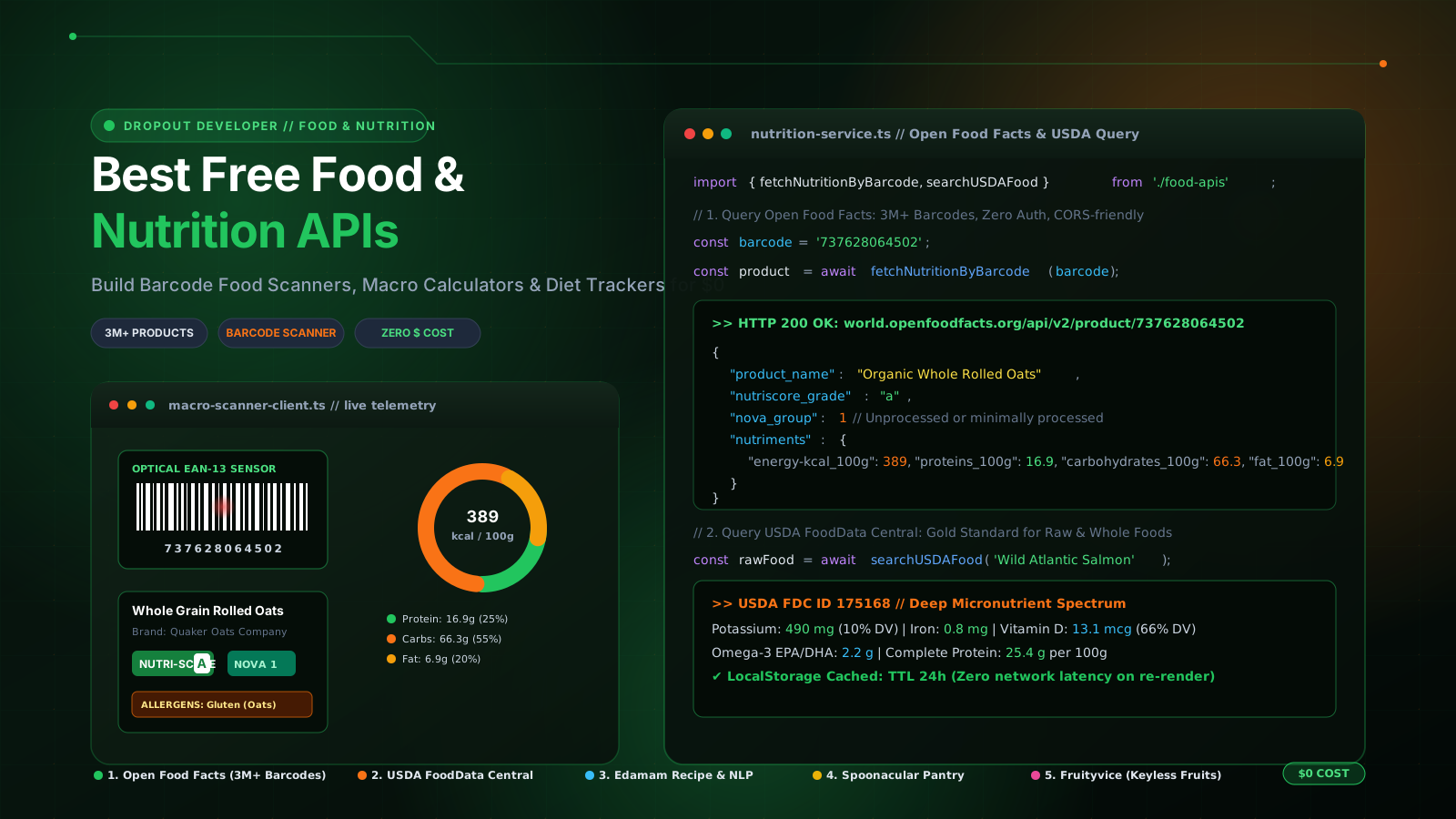
The Nutritionix Paywall: Why Most Fitness Portfolios Die at the Subscription Page
Every developer who gets serious about personal health eventually has the same thought: "Why am I using a bloated, ad-filled calorie tracker when I could build my own clean fitness app over the weekend?"
You can see the whole product in your mind: a clean dark-mode dashboard, an optical barcode scanner that reads grocery labels with your laptop or phone camera, real-time macronutrient donut charts, and an allergen alert system that warns you about dairy, gluten, or peanuts before you take a single bite. It is one of the highest-impact portfolio projects you can build because every interviewer understands food, nutrition, and personal health.
Then you hit the commercial API wall. You look up popular nutrition platforms like Nutritionix, FatSecret, or CalorieNinja, and discover that accessing their food database costs $300 to $500 every single month. Some even demand an upfront enterprise contract before giving you an API key.
Think about this from the perspective of an engineering student in a Tier-3 college, or a junior developer grinding through a 3.5 LPA mass-recruiter bond on a battered 8GB RAM laptop. You do not have $300 in your bank account, let alone $300 every month for an API key. Your budget is exactly zero rupees.
The good news is that you do not need commercial fitness APIs. The public API ecosystem provides massive, scientifically verified, community-driven nutrition datasets for free. With the right combination of open datasets, you can build a production-grade barcode food scanner, macro calculator, and meal planner without spending a single penny.
The 5 Best Free Food and Nutrition APIs for Developers
Here are the five best free food and nutrition APIs available today, detailing their authentication models, data structures, rate limits, and real-world project applications.
1. Open Food Facts API: 3,000,000+ Packaged Products with Global Barcode Lookup
If you want to build a real-time barcode food scanner, Open Food Facts is the most important food database on the internet. Operated as a non-profit collaborative project (often called the "Wikipedia of food"), it contains data on more than 3 million food products from over 150 countries.
The core superpower of Open Food Facts is its universal barcode lookup. You can take any standard grocery item with an EAN-13, EAN-8, or UPC-A barcode, pass the numbers into the REST endpoint, and get back an exhaustive breakdown of the product.
# Search any packaged product by its barcode (Zero API Key required)
curl -X GET "https://world.openfoodfacts.org/api/v2/product/737628064502.json"
Here is what the Open Food Facts API returns inside the product object:
{
  "code": "737628064502",
  "status": 1,
  "product": {
    "product_name": "Organic Whole Rolled Oats",
    "brands": "Bob's Red Mill",
    "nutriscore_grade": "a",
    "nova_group": 1,
    "allergens_tags": [
      "en:gluten"
    ],
    "nutriments": {
      "energy-kcal_100g": 389,
      "proteins_100g": 16.9,
      "carbohydrates_100g": 66.3,
      "fat_100g": 6.9,
      "fiber_100g": 10.6,
      "sodium_100g": 0.002
    },
    "image_front_url": "https://images.openfoodfacts.org/images/products/737/628/064/502/front_en.14.400.jpg"
  }
}
What makes this data gold for frontend developers:
- Nutri-Score Grades (A to E): An officially recognized nutritional quality score that grades foods from healthy green (A) to indulgent red (E). You can render this directly as a visual badge in your UI.
- NOVA Processing Classification: Groups food from 1 (unprocessed or minimally processed) to 4 (ultra-processed food formulations). This lets you build an "Ultra-Processed Food Radar" that warns users about heavy artificial additives.
- Allergen Detection: Tags for gluten, milk, eggs, nuts, soy, and shellfish allow you to build personalized diet filters for people with celiac disease or severe food allergies.
- CORS Support: The Open Food Facts API v2 returns wildcard
Access-Control-Allow-Origin: *headers, meaning you can query it directly from the browser using client-sidefetch()without setting up an intermediate backend proxy.
Rate Limits: Open Food Facts asks developers to keep read requests under 100 queries per minute per IP address, and to provide a meaningful User-Agent header identifying your project. This is more than generous enough for any interactive portfolio app.
2. USDA FoodData Central API: The Scientific Gold Standard for Whole Foods
Open Food Facts dominates packaged grocery items with barcodes. But what happens when your user eats a raw banana, grilled chicken breast, boiled basmati rice, or a bowl of boiled lentils? Packaged barcodes do not exist for fresh farm produce.
This is where the USDA FoodData Central (FDC) API becomes essential. Maintained by the Agricultural Research Service of the United States Department of Agriculture, FoodData Central is the global scientific benchmark for raw food nutrition.
Unlike crowd-sourced repositories where users might mislabel calorie counts, USDA data comes from rigorous laboratory chemical assays. It provides micro-level nutritional transparency covering over 100 biochemical parameters, including amino acid breakdowns (leucine, isoleucine, valine), fatty acid profiles, and trace minerals.
# Search for raw, unprocessed foods using the USDA FDC REST API
curl -X GET "https://api.nal.usda.gov/fdc/v1/foods/search?query=wild+salmon&dataType=Foundation&api_key=YOUR_API_KEY"
To use the USDA API, you register for a free API key at api.data.gov. Approval is instant and automated. The free quota gives you 1,000 requests per hour, which is practically unlimited for development and portfolio demonstrations.
Inside the USDA response, each nutrient has an official chemical ID:
{
  "fdcId": 175168,
  "description": "Fish, salmon, Atlantic, wild, raw",
  "foodNutrients": [
    {
      "nutrientId": 1008,
      "nutrientName": "Energy",
      "value": 142.0,
      "unitName": "KCAL"
    },
    {
      "nutrientId": 1003,
      "nutrientName": "Protein",
      "value": 25.4,
      "unitName": "G"
    },
    {
      "nutrientId": 1004,
      "nutrientName": "Total lipid (fat)",
      "value": 6.34,
      "unitName": "G"
    },
    {
      "nutrientId": 1005,
      "nutrientName": "Carbohydrate, by difference",
      "value": 0.0,
      "unitName": "G"
    },
    {
      "nutrientId": 1092,
      "nutrientName": "Potassium, K",
      "value": 490.0,
      "unitName": "MG"
    },
    {
      "nutrientId": 1110,
      "nutrientName": "Vitamin D (D2 + D3)",
      "value": 13.1,
      "unitName": "UG"
    }
  ]
}
By mapping these nutrient IDs in your client code, you can display both surface-level calories and deep biochemical breakdowns such as electrolytes (sodium vs potassium ratios) and bone health markers (calcium and vitamin D).
3. Edamam Food and Recipe API: Natural Language Meal Parsing
Scanning barcodes is fast, but real people often describe their meals in natural language: "I had 2 boiled eggs, a cup of black coffee, and 2 slices of whole wheat toast for breakfast."
Translating that messy human sentence into structured macronutrient metrics is normally a difficult natural language processing task. The Edamam Food and Recipe API solves this out of the box.
Edamam provides a free developer tier that accepts arbitrary text strings and parses out the individual ingredients, units of measurement, and cumulative nutritional totals.
# Send natural language meal text for instant nutritional computation
curl -X POST "https://api.edamam.com/api/nutrition-details?app_id=YOUR_APP_ID&app_key=YOUR_APP_KEY" \
     -H "Content-Type: application/json" \
     -d '{
       "title": "Breakfast Scramble",
       "ingr": [
         "2 large eggs",
         "1 slice whole wheat bread",
         "1 tsp butter"
       ]
     }'
The response aggregates total calories, diet labels (such as "Low-Carb" or "High-Protein"), health cautions, and daily percentage values. The free developer tier allows up to 10 requests per minute and 200 calls per day, which is ideal for letting users log custom multi-ingredient recipes with a single text box.
4. Spoonacular API: Pantry Ingredient Matcher and Diet Planner
What if your app needs to suggest healthy meals based on whatever groceries are already sitting in the user's kitchen? This is where the Spoonacular Food API stands out.
Spoonacular is an encyclopedia of recipes, meal plans, and grocery products. Its most popular endpoint is /recipes/findByIngredients, which allows you to pass a comma-separated list of items (e.g. apples,oats,cinnamon) and returns recipes that maximize those ingredients while minimizing missing pantry items.
# Find recipes you can make with leftover pantry ingredients
curl -X GET "https://api.spoonacular.com/recipes/findByIngredients?ingredients=apples,flour,sugar&number=2&apiKey=YOUR_API_KEY"
Key highlights of Spoonacular for portfolio projects:
- Dietary Lifestyle Filters: Search recipes by specific diet protocols including vegan, vegetarian, ketogenic, paleo, pescatarian, and gluten-free.
- Target Macro Meal Planning: Query the
/mealplanner/generateendpoint with a target calorie count (e.g.targetCalories=2200) and your preferred diet type to generate an automated 3-meal daily eating plan with matching recipes. - Nutritional Widget Rendering: Spoonacular provides pre-calculated visual breakdowns including price per serving, preparation time, and nutrient progress bars.
Free Quota: Spoonacular uses a daily point budget system. Free accounts receive 150 points per day. Standard ingredient lookups consume roughly 1 point each, giving you around 100 to 150 dynamic recipe queries every 24 hours.
5. Fruityvice API: 100% Keyless, Simple Fruit Nutrition for Rapid Prototyping
Sometimes you do not want to set up developer keys, read twenty pages of documentation, or deal with rate limit headers. You just want a clean, lightning-fast public API to query nutritional data for fresh fruit.
Fruityvice is a completely free, keyless REST API dedicated strictly to fruits. It requires zero authentication, supports full browser CORS, and responds in under 50 milliseconds.
# Query banana nutrition without any API key or signup
curl -X GET "https://www.fruityvice.com/api/fruit/banana"
The JSON response is clean, minimal, and standardized per 100 grams:
{
  "name": "Banana",
  "id": 1,
  "family": "Musaceae",
  "order": "Zingiberales",
  "genus": "Musa",
  "nutritions": {
    "calories": 96,
    "fat": 0.2,
    "sugar": 17.2,
    "carbohydrates": 22.0,
    "protein": 1.0
  }
}
Fruityvice is the perfect tool for building smoothie customizers, fruit salad macro calculators, or introductory frontend tutorials. If you want more public endpoints that require zero API keys or authentication headers, explore our curated guide on free public APIs without an API key.
Feature Comparison: Choosing the Right Food API for Your Stack
To help you choose the best data source for your application architecture, here is a breakdown of all five APIs across key technical parameters:
| API Name | Authentication | Primary Food Type | Barcode Scanning | Natural Language Parsing | Free Quota | Best Portfolio Use Case |
|---|---|---|---|---|---|---|
| Open Food Facts | None (Keyless) | Packaged grocery products | Yes (EAN/UPC barcodes) | No | 100 req / min | Barcode scanner, Nutri-Score badge & allergen alert apps |
| USDA FoodData Central | Free API Key (api.data.gov) | Raw, whole foods & generic commodities | Partial (Branded subset) | No (Keyword match) | 1,000 req / hour | Scientific macro trackers, micronutrient audits & whole foods |
| Edamam | App ID + App Key | Mixed meals & recipe ingredients | Yes (Database endpoint) | Yes (Full sentence parsing) | 10 req / min (Developer tier) | Natural language food diary & voice-to-macro logging |
| Spoonacular | Free API Key | Recipes, pantry ingredients & meals | Yes (Product endpoints) | Yes (Ingredient autocomplete) | 150 points / day | Pantry recipe matcher, diet planner & grocery optimizer |
| Fruityvice | None (Keyless) | Fresh fruits only | No | No | Unmetered fair use | Smoothie macro calculator & zero-auth frontend widgets |
Project Blueprint: Building MacroScan (Barcode Food Scanner + Whole Food Radar)
Now let us connect these data sources into a production-grade portfolio application called MacroScan. Instead of building another static todo app, MacroScan solves a practical real-world problem: helping users log both packaged snacks and raw home-cooked foods without paying for commercial subscriptions.
System Architecture
MacroScan uses a smart hybrid routing architecture:
- Dual-Input Ingestion: The user can either point their phone or laptop camera at a barcode using the native browser
BarcodeDetectorAPI (or type an EAN-13 number), or type a raw food query (like "sweet potato" or "boiled egg") into a search bar. - Smart Query Router:
- If the input is an 8 to 14 digit numeric string: The client sends a request to the Open Food Facts API to retrieve the packaged product, Nutri-Score grade, and allergen profile.
- If the input is an alphabetical food item: The client queries the USDA FoodData Central API for verified laboratory macronutrient and micronutrient metrics.
- If the input is a single fruit name: The client queries Fruityvice for instant, zero-auth data.
- Macro Normalization & Ratios: The client normalizes all inputs to standard gram measurements and calculates caloric contributions using standard biological combustion values:
- Protein: 4 calories per gram
- Carbohydrates: 4 calories per gram
- Fats: 9 calories per gram
- Offline LocalStorage Caching: Food items rarely change their nutritional composition overnight. MacroScan caches every successful barcode and food lookup in browser
localStoragewith a 24-hour Time-To-Live (TTL). Repeated scans load in zero milliseconds without making any network requests.
Production TypeScript Implementation: Complete Runnable Nutrition Client
Here is the complete, modular TypeScript implementation for MacroScan. It includes full type definitions, input validation, network error handling, TTL caching, and macronutrient ratio calculations.
/**
 * MacroScan Nutrition Client
 * Combines Open Food Facts (Barcodes), USDA FoodData Central (Whole Foods),
 * and Fruityvice (Keyless Fruit Nutrition) with LocalStorage Caching.
 */

export interface MacroNutrients {
  calories: number;
  proteinGrams: number;
  carbsGrams: number;
  fatGrams: number;
  fiberGrams?: number;
}

export interface MacroPercentages {
  proteinPercent: number;
  carbsPercent: number;
  fatPercent: number;
}

export interface FoodItem {
  id: string;
  source: 'open_food_facts' | 'usda' | 'fruityvice';
  name: string;
  brand?: string;
  servingSize: string;
  nutrientsPer100g: MacroNutrients;
  ratios: MacroPercentages;
  nutriscoreGrade?: 'a' | 'b' | 'c' | 'd' | 'e';
  novaGroup?: 1 | 2 | 3 | 4;
  allergens?: string[];
  imageUrl?: string;
}

interface CacheEnvelope<T> {
  data: T;
  cachedAt: number;
  ttlMs: number;
}

/**
 * Utility: Cache responses in LocalStorage with TTL
 */
async function withLocalStorageCache<T>(
  key: string,
  ttlMs: number,
  fetcher: () => Promise<T>
): Promise<T> {
  const cacheKey = `macroscan_cache_${key}`;

  if (typeof window !== 'undefined' && window.localStorage) {
    try {
      const raw = localStorage.getItem(cacheKey);
      if (raw) {
        const envelope: CacheEnvelope<T> = JSON.parse(raw);
        const age = Date.now() - envelope.cachedAt;
        if (age < envelope.ttlMs) {
          return envelope.data;
        }
        localStorage.removeItem(cacheKey);
      }
    } catch {
      // In case of parsing errors or quota limits, proceed to fetch
    }
  }

  const freshData = await fetcher();

  if (typeof window !== 'undefined' && window.localStorage) {
    try {
      const envelope: CacheEnvelope<T> = {
        data: freshData,
        cachedAt: Date.now(),
        ttlMs,
      };
      localStorage.setItem(cacheKey, JSON.stringify(envelope));
    } catch (e) {
      console.warn('LocalStorage quota exceeded or restricted:', e);
    }
  }

  return freshData;
}

/**
 * Calculate Macro Percentage Splits
 * Standard conversion: 4 kcal/g for Protein, 4 kcal/g for Carbs, 9 kcal/g for Fat
 */
export function calculateMacroPercentages(macros: MacroNutrients): MacroPercentages {
  const proteinKcal = macros.proteinGrams * 4;
  const carbsKcal = macros.carbsGrams * 4;
  const fatKcal = macros.fatGrams * 9;
  const totalCalculatedKcal = proteinKcal + carbsKcal + fatKcal;

  if (totalCalculatedKcal <= 0) {
    return { proteinPercent: 0, carbsPercent: 0, fatPercent: 0 };
  }

  return {
    proteinPercent: Math.round((proteinKcal / totalCalculatedKcal) * 100),
    carbsPercent: Math.round((carbsKcal / totalCalculatedKcal) * 100),
    fatPercent: Math.round((fatKcal / totalCalculatedKcal) * 100),
  };
}

/**
 * 1. Fetch Packaged Food by Barcode (Open Food Facts v2)
 * Free, Keyless, Wildcard CORS
 */
export async function fetchByBarcode(
  barcode: string,
  signal?: AbortSignal
): Promise<FoodItem> {
  const cleanBarcode = barcode.trim();
  if (!/^\d{8,14}$/.test(cleanBarcode)) {
    throw new Error(`Invalid barcode format: ${cleanBarcode}. Must be 8 to 14 numeric digits.`);
  }

  const ttl24Hours = 24 * 60 * 60 * 1000;

  return withLocalStorageCache(`barcode_${cleanBarcode}`, ttl24Hours, async () => {
    const url = `https://world.openfoodfacts.org/api/v2/product/${encodeURIComponent(cleanBarcode)}.json`;

    const res = await fetch(url, {
      signal,
      headers: {
        'User-Agent': 'MacroScanApp/1.0.0 (contact@dropoutdeveloper.in)',
      },
    });

    if (!res.ok) {
      throw new Error(`Open Food Facts API error: HTTP ${res.status}`);
    }

    const payload = await res.json();

    if (payload.status !== 1 || !payload.product) {
      throw new Error(`Product with barcode ${cleanBarcode} was not found in Open Food Facts.`);
    }

    const p = payload.product;
    const nutriments = p.nutriments || {};

    const macros: MacroNutrients = {
      calories: Math.round(nutriments['energy-kcal_100g'] ?? (nutriments['energy_100g'] ? nutriments['energy_100g'] / 4.184 : 0)),
      proteinGrams: Number(nutriments.proteins_100g ?? 0),
      carbsGrams: Number(nutriments.carbohydrates_100g ?? 0),
      fatGrams: Number(nutriments.fat_100g ?? 0),
      fiberGrams: nutriments.fiber_100g ? Number(nutriments.fiber_100g) : undefined,
    };

    const allergens = Array.isArray(p.allergens_tags)
      ? p.allergens_tags.map((a: string) => a.replace(/^en:/, ''))
      : [];

    return {
      id: cleanBarcode,
      source: 'open_food_facts',
      name: p.product_name || 'Unnamed Food Product',
      brand: p.brands || undefined,
      servingSize: p.serving_size || '100g',
      nutrientsPer100g: macros,
      ratios: calculateMacroPercentages(macros),
      nutriscoreGrade: p.nutriscore_grade ? (p.nutriscore_grade.toLowerCase() as any) : undefined,
      novaGroup: p.nova_group ? (Number(p.nova_group) as any) : undefined,
      allergens,
      imageUrl: p.image_front_url || undefined,
    };
  });
}

/**
 * 2. Search Whole Foods via USDA FoodData Central (FDC)
 * Requires free API key from api.data.gov (1,000 req/hr)
 */
export async function searchUSDAWholeFood(
  query: string,
  apiKey: string,
  signal?: AbortSignal
): Promise<FoodItem[]> {
  const trimmed = query.trim();
  if (!trimmed) return [];

  const cacheKey = `usda_${trimmed.toLowerCase()}`;
  const ttl12Hours = 12 * 60 * 60 * 1000;

  return withLocalStorageCache(cacheKey, ttl12Hours, async () => {
    const endpoint = `https://api.nal.usda.gov/fdc/v1/foods/search?query=${encodeURIComponent(
      trimmed
    )}&dataType=Foundation,SR%20Legacy&pageSize=5&api_key=${encodeURIComponent(apiKey)}`;

    const res = await fetch(endpoint, { signal });
    if (!res.ok) {
      throw new Error(`USDA FoodData Central API error: HTTP ${res.status}`);
    }

    const data = await res.json();
    if (!data.foods || !Array.isArray(data.foods)) {
      return [];
    }

    return data.foods.map((food: any) => {
      const nutrients = food.foodNutrients || [];

      // Find nutrient values by official USDA nutrient IDs
      const findNutrient = (id: number): number => {
        const item = nutrients.find((n: any) => n.nutrientId === id);
        return item ? Number(item.value) || 0 : 0;
      };

      const calories = findNutrient(1008); // Energy (kcal)
      const protein = findNutrient(1003);  // Protein (g)
      const fat = findNutrient(1004);      // Total lipid (fat) (g)
      const carbs = findNutrient(1005);    // Carbohydrate by difference (g)
      const fiber = findNutrient(1079);    // Fiber, total dietary (g)

      const macros: MacroNutrients = {
        calories: Math.round(calories),
        proteinGrams: Number(protein.toFixed(1)),
        carbsGrams: Number(carbs.toFixed(1)),
        fatGrams: Number(fat.toFixed(1)),
        fiberGrams: fiber > 0 ? Number(fiber.toFixed(1)) : undefined,
      };

      return {
        id: String(food.fdcId),
        source: 'usda',
        name: food.description,
        servingSize: '100g',
        nutrientsPer100g: macros,
        ratios: calculateMacroPercentages(macros),
      };
    });
  });
}

/**
 * 3. Fetch Fresh Fruit via Fruityvice
 * 100% Free, Zero Key, Wildcard CORS
 */
export async function fetchFruitNutrition(
  fruitName: string,
  signal?: AbortSignal
): Promise<FoodItem> {
  const cleanName = fruitName.trim().toLowerCase();
  if (!cleanName) throw new Error('Fruit name is required.');

  const ttl24Hours = 24 * 60 * 60 * 1000;

  return withLocalStorageCache(`fruit_${cleanName}`, ttl24Hours, async () => {
    const url = `https://www.fruityvice.com/api/fruit/${encodeURIComponent(cleanName)}`;

    const res = await fetch(url, { signal });
    if (!res.ok) {
      throw new Error(`Fruityvice API error: HTTP ${res.status}`);
    }

    const payload = await res.json();
    const n = payload.nutritions || {};

    const macros: MacroNutrients = {
      calories: Math.round(Number(n.calories || 0)),
      proteinGrams: Number(Number(n.protein || 0).toFixed(1)),
      carbsGrams: Number(Number(n.carbohydrates || 0).toFixed(1)),
      fatGrams: Number(Number(n.fat || 0).toFixed(1)),
    };

    return {
      id: `fruit_${payload.id || cleanName}`,
      source: 'fruityvice',
      name: payload.name,
      brand: `Family: ${payload.family || 'Botanical'}`,
      servingSize: '100g',
      nutrientsPer100g: macros,
      ratios: calculateMacroPercentages(macros),
    };
  });
}
How to Handle CORS and Rate Limiting Like a Senior Engineer
When you build frontend applications that consume multiple third-party APIs, you will encounter two inevitable engineering challenges: browser security policies and rate limit throttles.
1. Handling CORS Restrictions
Both Open Food Facts and Fruityvice support wildcard CORS out of the box, meaning you can call them directly from client-side JavaScript in modern browsers. However, some enterprise APIs or private endpoints reject direct browser origins.
If you encounter cross-origin blocks, do not install dangerous browser extensions that disable web security. Instead, implement a clean 10-line serverless route using Next.js App Router (app/api/food-proxy/route.ts):
import { NextRequest, NextResponse } from 'next/server';

export async function GET(request: NextRequest) {
  const barcode = request.nextUrl.searchParams.get('barcode');
  if (!barcode) {
    return NextResponse.json({ error: 'Barcode parameter is required' }, { status: 400 });
  }

  try {
    const res = await fetch(`https://world.openfoodfacts.org/api/v2/product/${encodeURIComponent(barcode)}.json`, {
      headers: {
        'User-Agent': 'MacroScanProxy/1.0.0 (contact@dropoutdeveloper.in)',
      },
      next: { revalidate: 86400 }, // Cache on edge for 24 hours
    });

    if (!res.ok) {
      return NextResponse.json({ error: 'Upstream food API error' }, { status: res.status });
    }

    const data = await res.json();
    return NextResponse.json(data);
  } catch (err: any) {
    return NextResponse.json({ error: 'Proxy request failed' }, { status: 500 });
  }
}
For an in-depth explanation of preflight requests, headers, and edge proxies, read our practical guide on how to fix CORS errors when calling public APIs.
2. Rate Limit Discipline and Debouncing
When implementing a search-as-you-type input for USDA foods, never trigger a network request on every single keystroke. If a user types "chicken breast", unthrottled code will fire 13 consecutive network requests within two seconds, quickly depleting your hourly quota and freezing the UI.
Always wrap user search inputs in a 300ms debounce timer and combine it with an AbortController to cancel pending inflight requests when a new keystroke arrives.
Why Building a Nutrition App Proves Real Engineering Skills in Interviews
If you talk to senior engineers and hiring managers, they will tell you that 90% of junior candidate portfolios look identical: generic todo apps, clone calculators, or static mock e-commerce pages that display hardcoded JSON files.
When you present MacroScan during a technical interview, the conversation immediately shifts to practical engineering decisions:
- Data Normalization: You managed heterogeneous schemas across multiple public data providers (Open Food Facts returns nested nutrient objects, USDA uses numeric chemical IDs, and Fruityvice returns simple key-value pairs). You unified them into a clean, predictable TypeScript interface.
- Hardware Integration: You implemented real-time barcode detection using the browser's native optical APIs, handling camera permissions, video stream canvas capture, and fallback manual input.
- Client-Side Performance: You built an offline-first caching system with TTL expiration in
localStorage, drastically cutting network latency and respecting public API rate limits. - Mathematical UI Visualization: You calculated macro percentage ratios dynamically using biological energy multipliers (4/4/9 kcal/g) and rendered custom SVG visual donut charts without loading heavy 500KB chart libraries.
Stop wasting your weekends building basic todo apps that never get you hired. Read our manifesto on why you should stop building todo apps and use free public APIs.
Pick up the Open Food Facts and USDA endpoints, open your code editor, wire up your macro client, and build something real today.