The Developer Health Crisis: RSI and Carpal Tunnel
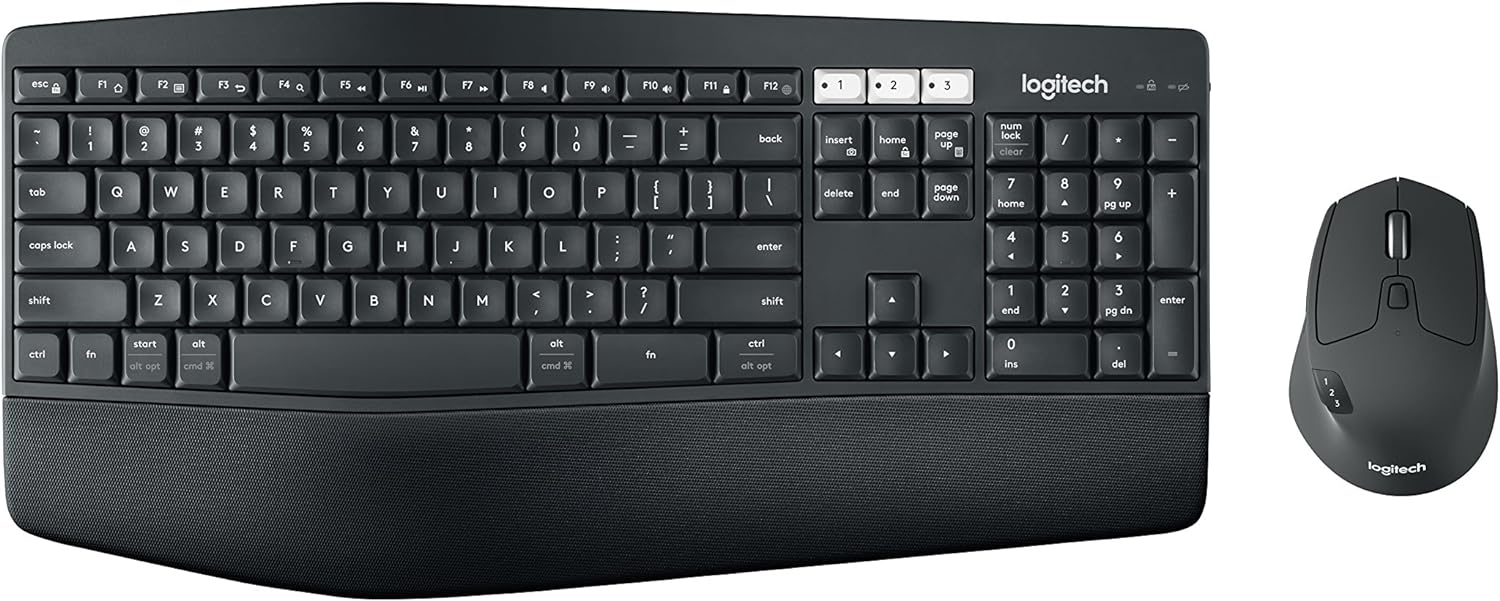
Software engineering is an occupational endurance sport for hands and wrists. Typing tens of thousands of keystrokes each day while anchoring your wrists to hard desk edges causes chronic strain. Repetitive Strain Injury (RSI), carpal tunnel syndrome, and ulnar nerve entrapment have prematurely ended promising software engineering careers. Yet most developers spend $3,000 on a laptop while working on $20 mushy membrane keyboard combos that actively harm their tendons.
Developer ergonomics is not about fluffy wrist rests. It is about reducing forearm pronation, eliminating wrist extension, and minimizing finger travel distance using mechanical switches, column-staggered split boards, and programmable firmware layers.
The Biomechanics of Typing Pain
Traditional computer keyboards force three physiological postures that damage upper extremities over time:
- Forearm Pronation: A standard flat keyboard requires you to turn your palms completely flat against the desk. This forces the radius and ulna bones in your forearms to cross, compressing the median nerve.
- Ulnar Deviation: Because standard keyboards place your hands close together right in front of your chest, your wrists must bend outwards toward your pinky fingers. Typing in this position places constant tension on wrist tendons.
- Wrist Extension (Dorsiflexion): Angling your hands upwards because a keyboard sits too high or tilts backward compresses the carpal tunnel, creating numbness in the fingers.
Hardware Comparison: Membrane Combos vs. Split Ergonomic Boards
| Ergonomic Factor | Generic Membrane Combo (e.g. MK850) | Split Mechanical Keyboard (e.g. Moonlander / Corne) |
|---|---|---|
| Hand Placement | Fixed width (Forces shoulder hunching) | Completely split (Shoulder-width natural alignment) |
| Tenting Angle | Flat (0 degrees tenting) | Adjustable tenting (15 to 45 degrees to avoid pronation) |
| Switch Actuation | Must bottom out completely (Rubber dome fatigue) | Actuates halfway down (Linear/Tactile mechanical switches) |
| Thumb Utilization | Only presses the single Spacebar | Thumb clusters handle Enter, Backspace, Delete, and Shift |
| Firmware Programmability | Limited vendor proprietary software | Open-source QMK / ZMK / VIA hardware firmware |
Eliminating Hand Travel with QMK Home-Row Mods
On a traditional keyboard, reaching for Ctrl, Alt, or Cmd requires twisting your wrist and stretching your pinky (the notorious "Emacs pinky"). With open-source QMK firmware, developers configure Home-Row Modifiers: when you tap a home-row key (such as A, S, D, F), it sends the normal character; when you hold that same key down, it acts as a modifier (Shift, Ctrl, Alt, Cmd).
Below is a working QMK C configuration showing how home-row mods and thumb layer taps are declared in a production keymap.c file:
// qmk_firmware/keyboards/corne/keymaps/developer/keymap.c
#include QMK_KEYBOARD_H

// Custom Layer Definitions
enum custom_layers {
    _QWERTY,
    _NAV,
    _SYM,
};

// Home Row Mod Macros (Tap for key, Hold for modifier)
#define HM_A LCTL_T(KC_A)
#define HM_S LALT_T(KC_S)
#define HM_D LGUI_T(KC_D)
#define HM_F LSFT_T(KC_F)

#define HM_J RSFT_T(KC_J)
#define HM_K RGUI_T(KC_K)
#define HM_L LALT_T(KC_L)
#define HM_SCLN RCTL_T(KC_SCLN)

// Layer Tap for Thumbs (Tap for Space/Enter, Hold for Symbol Layer)
#define NAV_SPC LT(_NAV, KC_SPC)
#define SYM_ENT LT(_SYM, KC_ENT)

const uint16_t PROGMEM keymaps[][MATRIX_ROWS][MATRIX_COLS] = {
    // Base QWERTY Layer
    [_QWERTY] = LAYOUT_split_3x6_3(
        KC_TAB,  KC_Q,  KC_W,  KC_E,  KC_R,  KC_T,         KC_Y,  KC_U,  KC_I,     KC_O,   KC_P,    KC_BSPC,
        KC_ESC,  HM_A,  HM_S,  HM_D,  HM_F,  KC_G,         KC_H,  HM_J,  HM_K,     HM_L,   HM_SCLN, KC_QUOT,
        KC_LSFT, KC_Z,  KC_X,  KC_C,  KC_V,  KC_B,         KC_N,  KC_M,  KC_COMM,  KC_DOT, KC_SLSH, KC_RSHIFT,
                               KC_LGUI, NAV_SPC, KC_TAB,   SYM_ENT, KC_BSPC, KC_RALT
    ),

    // Navigation Layer (Arrow keys right under your home fingers!)
    [_NAV] = LAYOUT_split_3x6_3(
        _______, _______, _______, _______, _______, _______,   KC_HOME, KC_PGDN, KC_PGUP, KC_END,  _______, KC_DEL,
        _______, KC_LCTL, KC_LALT, KC_LGUI, KC_LSFT, _______,   KC_LEFT, KC_DOWN, KC_UP,   KC_RGHT, _______, _______,
        _______, _______, _______, _______, _______, _______,   _______, _______, _______, _______, _______, _______,
                                  _______, _______, _______,   _______, _______, _______
    )
};
The Mouse Dilemma: Trackballs vs. Vertical Mice
Traditional computer mice force continuous forearm dragging across your desk surface. For developers spending substantial time inside IDEs and terminals, switching to an alternative pointing device immediately relieves wrist tension:
- Vertical Mice: Position your hand in a neutral "handshake" angle (typically 57 degrees). This eliminates forearm pronation completely. Good starting option for those accustomed to standard mice.
- Finger / Thumb Trackballs (e.g. Ploopy, Kensington Expert): Your arm remains completely stationary. You manipulate a weighted sphere with your fingers or thumb. Eliminates friction and shoulder strain during long coding sessions.
- Vim Keybindings: The most ergonomic pointing device is no pointing device at all. Mastering Neovim navigation or VSCode Vim keybindings keeps your hands glued to the home row 95% of your working day.
Desk Setup Checklist for Pain-Free Coding
- Monitor Height: The top third of your display should be at exact eye level when sitting upright. If you look down, your neck muscles bear the equivalent of a 30-pound bowling ball.
- Elbow Angle: Keep elbows bent at 90 to 100 degrees. Forearms should run parallel to the floor, never sloping upwards to reach a high desk.
- Sit-Stand Cadence: Sitting for eight hours continuously degrades circulation. Follow a 45/15 rule: 45 minutes of seated coding followed by 15 minutes of standing focus.
Summary
Investing in your physical developer workstation is not an indulgence; it is preventative maintenance for your engineering career. By adopting split keyboard layouts, exploring QMK home-row modifiers, and replacing traditional mice with ergonomic trackballs, you can write clean code for decades without pain.